
Extract business contact details
Add published emails, phone numbers and social links to selected business records.
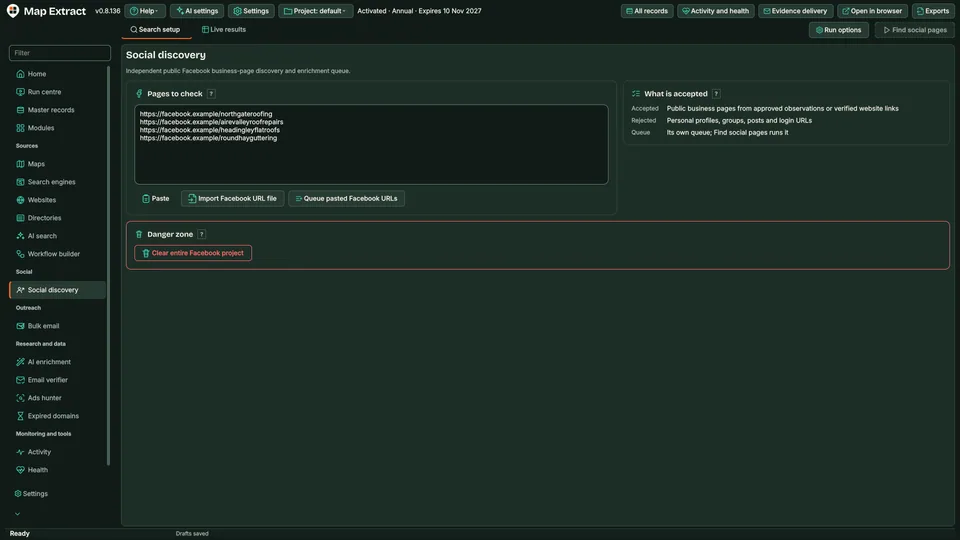
Map Extract takes the profile links a business publishes on its website or map listing, opens the public Facebook, Instagram and YouTube pages without signing in and checks each one against the business domain before adding its details to the record.
Facebook and Instagram are trademarks of their owners. Map Extract is not affiliated with or endorsed by them.
The short versionThe right social pages, attached to the right business.
A tool that finds a business's public Facebook, Instagram and YouTube pages and adds their details to its record.
Shows how active a prospect is on social media and adds extra contact routes, without mixing in pages from a different business with a similar name.
Public Facebook, Instagram and YouTube details attached to the right business, each with a match score and reason.
Real column names from the module schema. A field is filled only when its source publishes the value.
platformurlusernamenamecategoryaboutwebsitephoneemailaddressimage_urlverifiedfollowersfollowingpostspage_idlast_public_activityextraemail_1email_1_typeemail_1_source_urlemail_1_confidenceemail_2email_2_typeemail_2_source_urlemail_2_confidenceemail_3email_3_typeemail_3_source_urlemail_3_confidenceemail_4email_4_typeemail_4_source_urlemail_4_confidenceemail_5email_5_typeemail_5_source_urlemail_5_confidenceemail_6email_6_typeemail_6_source_urlemail_6_confidenceemail_7email_7_typeemail_7_source_urlemail_7_confidenceemail_8email_8_typeemail_8_source_urlemail_8_confidenceemail_9email_9_typeemail_9_source_urlemail_9_confidenceemail_10email_10_typeemail_10_source_urlemail_10_confidenceemail_countemail_typessite_input_valuesite_domainsite_registrable_domainsite_effective_domainsite_effective_urlsite_domain_match_statussite_statussite_http_statussite_response_time_mssite_redirectedsite_redirect_chainsite_parkedsite_parked_providersite_blockedsite_block_typesite_captcha_detectedsite_robots_allowedsite_meta_titlesite_meta_descriptionsite_canonical_urlsite_languagesite_cmssite_cms_confidencesite_frameworksite_ecommerce_platformsite_serversite_cdnsite_wafsite_ipsite_ipv6site_asnsite_hostingsite_nameserverssite_tldsite_tld_typesite_country_inferredsite_country_inference_sourcesite_ssl_validsite_ssl_expirysite_jsonld_typessite_jsonld_business_namesite_jsonld_legal_namesite_jsonld_descriptionsite_jsonld_logo_urlsite_jsonld_image_urlsite_jsonld_addresssite_jsonld_street_addresssite_jsonld_postcodesite_jsonld_citysite_jsonld_regionsite_jsonld_countrysite_jsonld_latitudesite_jsonld_longitudesite_jsonld_phonesite_jsonld_emailsite_jsonld_whatsappsite_jsonld_telegramsite_company_numbersite_vat_numbersite_phone_1site_phone_2site_whatsappsite_telegramsite_social_facebooksite_social_instagramsite_social_tiktoksite_social_xsite_social_linkedinsite_social_youtubesite_social_pinterestsite_social_threadssite_social_snapchatsite_trustpilot_urlsite_google_maps_urlsite_contact_pagesite_about_pagesite_privacy_pagesite_terms_pagesite_registration_pagesite_login_pagesite_booking_pagesite_sitemap_urlsite_favicon_urlsite_logo_urlsite_ads_facebooksite_ads_instagramsite_ads_tiktoksite_ads_googlesite_ads_adsensesite_google_analyticssite_google_tag_managersite_meta_pixelsite_tiktok_pixelsite_linkedin_insightsite_business_category_detectedsite_restricted_content_categoryfb_page_idfb_page_urlfb_usernamefb_page_namefb_categoryfb_additional_categoriesfb_verifiedfb_logo_urlfb_featured_image_urlfb_addressfb_cityfb_regionfb_postcodefb_countryfb_latitudefb_longitudefb_phonefb_emailfb_websitefb_domainfb_whatsappfb_foundedfb_followersfb_followingfb_likesfb_ratingfb_total_reviewsfb_opening_hoursfb_price_rangefb_aboutfb_descriptionfb_servicesfb_service_areafb_instagram_urlfb_messenger_urlfb_last_public_activityfb_external_linksfb_domain_match_scorefb_match_reasonfb_has_pageig_profile_idig_urlig_usernameig_display_nameig_verifiedig_profile_image_urlig_bioig_followersig_followingig_total_postsig_websiteig_domainig_categoryig_business_emailig_business_phoneig_business_addressig_facebook_urlig_last_public_activityig_external_linksig_link_hub_urlig_domain_match_scoreig_match_reasonig_has_profileYou provide Public business profile URLs and profiles linked from business websites.
You get A local B2B database with business contacts, website and social details, ready for CSV export and reviewed outreach.
Profile links come from business websites, verified Maps listings or URLs you paste. Each business gets its Facebook, Instagram and YouTube work queued in turn.
Map Extract crawls the business website at the level you choose (Fast, Balanced or Deep) and checks eligible public Facebook, Instagram and YouTube profiles. A listing or profile is attached only when its website domain and other evidence match, and the match reason is stored.
Optional AI research fills gaps for eligible fields where evidence is available. Each accepted value keeps its source URL and supporting passage; unsupported suggestions stay blank. Layer 3 can add extra facts the website states, and foreign-language descriptions gain an English version beside the original.
Check each record, its sources and its state: captured, enriched, held for review or ready to send. Every email address carries an inbox purpose, such as sales or bookings, and a verification verdict that says which checks were run.
Export approved records as CSV, XLSX or JSONL, filtered by quality, source and date, or pass them to an outreach module. Outreach keeps its own permission checks, suppression and approval steps.
Start with a list of websites and finish with complete business records.
"@type": "LocalBusiness"Step by step
The software builds and runs your search queue
Profile links come from business websites, verified Maps listings or URLs you paste. Each business gets its Facebook, Instagram and YouTube work queued in turn.Map Extract prepares jobs from your keywords, locations or imported URLs.
Add published emails, phone numbers and social links to selected business records.
Build a relevant profile shortlist and prepare supported messages or engagement.
Use Map Extract lawfully and only for a legitimate purpose. Read the responsible use policy. Projects are stored locally on your Windows PC. Public business and social results the app collects are uploaded automatically to Map Extract's servers while it is licensed and running, as the Privacy Notice explains.
No. This module reads public pages signed out. Account-based actions belong to the separate Instagram, TikTok, X and YouTube modules.
Details such as Instagram username, bio, follower count and business email, Facebook page details, and YouTube channel name, subscribers, video count and country, where the profile shows them.
Map Extract saves what each source publishes and keeps the source link beside it. Listings are attached by matching website domains, results from the wrong area are flagged, and AI values need a supporting passage before they are saved. Sources change and can be incomplete, so review records before you rely on them.
Projects are stored locally on your Windows PC in a SQLite database, and you choose what to export. Runs send requests to the sources you enable and, if you turn AI on, your prompt and the chosen context go to the AI provider you select. Public business and social results the app collects are uploaded automatically to Map Extract's servers while it is licensed and running; the Privacy Notice explains this.
Map Extract opens supported public profiles and extracts available names, bios, contact details and website links.
Map Extract reads website HTML, contact pages and JSON-LD, detects CMS signals and follows linked Facebook and Instagram sources. Matching details are added to the same business record.
Map Extract saves business records in a local SQLite database on your Windows computer. Export selected records to CSV for your CRM or use them in the outreach modules. Requests to Gemini and other configured services use those services separately.
Pass reviewed records to an outreach module. Bulk Email Sender holds any recipient without a recorded permission basis and requires an opt-out in every message. Contact form and social modules have their own limits, and nothing is sent until you enable it.
Where business emails appear on Instagram (contact buttons, bio text, link-in-bio pages), how to follow up on the website and record each email's source.
Find local businesses on Instagram, Facebook, TikTok, X and YouTube: start from websites, match profiles by domain, read public fields and respect limits.
What Instagram's 'we limit how often you can do certain things' message means, what Instagram actually says, why quoted limits differ, and how to pace safely.
Read the Social Media Business Discovery guide, check the free demo status and the system requirements, then choose a licence for your Windows PC.