
Research TikTok creators
Find creator profiles and evaluate their public business relevance.
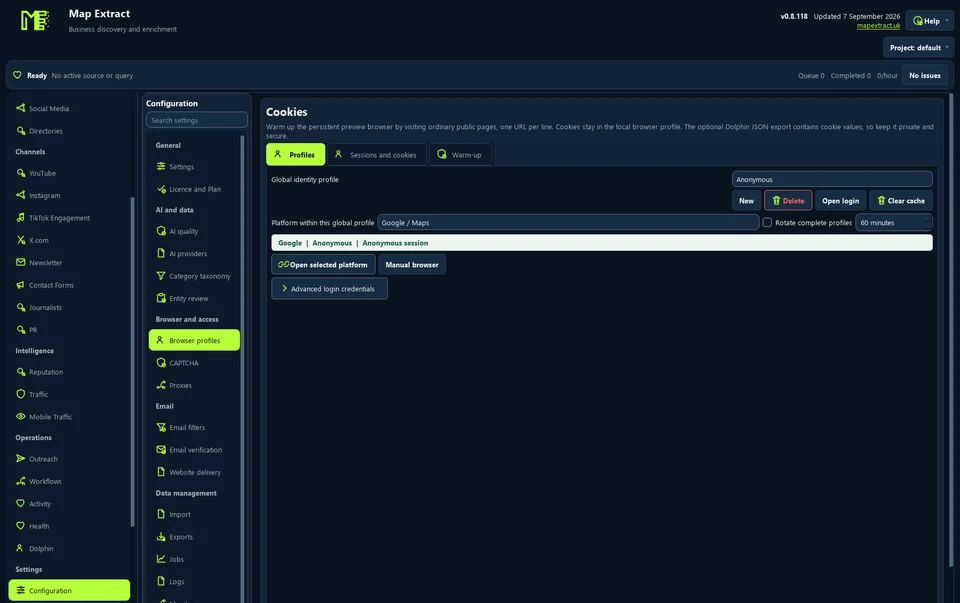
Keep a separate browser profile for each platform and project, with its own cookies, sessions and optional authenticated proxy. Login capture is opt-in and encrypted by Windows, portable exports are password encrypted, and security challenges always stay with you.
The short versionEach account in its own browser, kept tidy.
A tool that keeps a separate saved browser for each platform account and project, so logins and cookies never mix.
Lets you manage several accounts, such as a client's and your own, without them getting tangled. Profiles do not lift platform restrictions or make an account anonymous.
Each account keeps its own separate browser, and security checks stay with you.
Step by step
Separate saved browser identities per account and project, switched only at safe points between jobs.
Real column names from the module schema. A field is filled only when its source publishes the value.
dolphin_profile_idnamemetadata_jsonlast_seen_atlast_used_atmodule_last_usedYou provide Authorised accounts, saved browser sessions and optional proxy settings.
You get Reusable account sessions so each workflow uses the intended browser identity.
Saved browser identity
Complete login and any verification in the browser.
Automated workflow. Playing it does not open accounts, send email, publish files or run tests.
Find creator profiles and evaluate their public business relevance.
Lead Generation public X profiles and use the separate posting tool for your own content.
Find relevant YouTube channels and publish your own local videos through Studio.
Use Map Extract lawfully and only for a legitimate purpose. Read the responsible use policy. Projects are stored locally on your Windows PC. Public business and social results the app collects are uploaded automatically to Map Extract's servers while it is licensed and running, as the Privacy Notice explains.
Login capture is opt-in and encrypted by Windows for the site it belongs to. Portable profile exports are protected with a password (AES-GCM). Login prefill never submits a form for you.
A list of account issues found during runs, such as expired sessions or checkpoints, for you to review and fix.
No. Sessions can expire and platforms can request additional verification. Check the account in the login browser before relying on it.
No. Any proxy or external profile service needs its own configuration and access.
No. Credentials and project data are stored separately from the executable; Windows Credential Manager is used for supported stored credentials.
No. Integration depends on the supported module and provider path. Check the controls for the specific workflow.
No. Each platform needs its own usable saved login or session within that identity. Check the selected platform’s status before starting its module.
Rotation depends on the module. Some wait for a completed job; some campaigns keep the chosen account fixed. A rotation interval does not override those module rules.
Why Google shows 'Our systems have detected unusual traffic from your computer network', what causes it, and the right response when you run lead collection.
Detect parked, expired, redirected and dead websites in a lead list with DNS, HTTP and content checks, and why web designers should treat them as leads.
Why your scraper is blocked and what to do: CAPTCHAs, 403, 429, empty pages, login walls and timeouts, with polite fixes and clear signs it is time to stop.
Read the Browser Profiles guide, check the free demo status and the system requirements, then choose a licence for your Windows PC.