
Map Extract
Website testing · Coming soon

Mobile test planner for Android devices

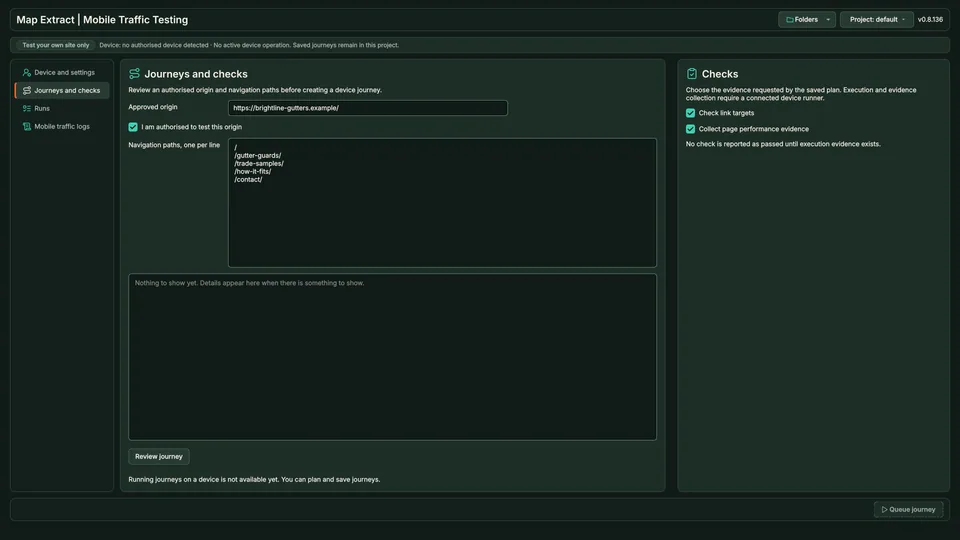
Check a connected Android device over ADB, save the website and actions you want to test, and build a queue for later. This preview stores plans and checks devices; running the journeys on the device is not connected yet.
  • Windows desktop app
  • Data saved in your local project
  • Operational module
Mobile traffic testing Journeys and checks page with an approved origin and navigation paths

At a glance: Mobile Journey Planner

The short versionComing soon: plan mobile site tests ahead.

What it is

Coming soon: a tool to plan website tests on a connected Android phone. Running the tests on the phone is not connected yet.

What it does

  • Checks an Android phone connected to your PC
  • Saves the website and actions you want tested
  • Builds a queue of planned tests

How it helps your business

Will let you prepare mobile test plans for sites you look after, ready for when device testing is connected. A queued plan is not a test result.

Good for

  • Planning mobile tests for your own site
  • Preparing test plans for clients
  • Checking a test phone is connected

Suitable for

  • Web designers
  • Marketing agencies
  • Website owners
Plain English: what the terms mean (2 terms)
Coming soon
Shown on the site so you know what is planned, but not part of the current release.
ADB
Android Debug Bridge: a standard way for a PC to talk to an Android phone over a cable.

See it in action

Plan Android tests now; running them on the device comes later.

Coming soon. Illustrative data. Plans are saved; device execution is not connected yet. Motion is reduced, so the finished scene is shown.

Step by step

  1. A connected Android phone is found, with its basic details.
  2. A website address and a list of actions (open page, scroll, tap menu) are saved as a plan.
  3. The plan joins the queue.
  4. The queue shows the plan as planned, not run: running on the device is not connected yet.
Fields and features

What you get

Saved mobile test plans and device checks, ready for when device execution is added.

Prepare mobile test steps and check the connected device

  • Check the connected Android deviceInspect ADB detection and the selected device before saving a test plan.
  • Save targets and actionsPrepare the website, browser and intended mobile navigation steps.
  • Configure timing and the queueStore the pacing and run settings for the planned journey.
  • Know the current execution limitThis version supports planning and device checks. Mobile test execution is not connected in this version.

Field names9 field names

Real column names from the module schema. A field is filled only when its source publishes the value.

Mobile Journey Planner record9Saved record
  • id
  • device_serial
  • target_origin
  • browser_package
  • viewport
  • state
  • started_at
  • completed_at
  • last_error
4 steps

How it works

You provide A connected device, target URLs and mobile journey settings.

You get Saved mobile test plans and queued work; completed device tests are not yet available.

  1. Check the connected Android device

  2. Add the planned actions and expected results

  3. Save the test plan

  4. Prepare the run queue

SEE THE TASK, SETTINGS AND RESULT

Mobile Journey Planner: follow a worked example

● ● ●Mobile Journey PlannerProject workspace
thames-dental.example
THAMES DENTAL

Book an appointment

Choose a time to visit our Walton practice.

Monday, 10:00
New patient appointment
Continue to booking

Automated workflow. Playing it does not open accounts, send email, publish files or run tests.

Use cases

Where Mobile Journey Planner fits

  • Website testing
  • Automation and developer workflows

Test authorised browser journeys

Inspect website navigation and save mobile journey plans.

Responsible use

Safeguards and responsible use

Settings you control

Android connection
Check ADB and the detected device.
Journey plan
Save the target website and intended actions.
Plan settings
Save browser and timing choices.

Good to know

  • Preview: device execution is not connected.
  • A queued journey is a plan, not a run or a result.
  • ADB access to the device is needed for device checks.

Use Map Extract lawfully and only for a legitimate purpose. Read the responsible use policy. Projects are stored locally on your Windows PC. Public business and social results the app collects are uploaded automatically to Map Extract's servers while it is licensed and running, as the Privacy Notice explains.

Questions

Mobile Journey Planner FAQ

Can it run the mobile journey today?

No. The current preview explicitly leaves device execution disconnected. Do not buy it on the assumption that automated mobile runs are already available.

Does detecting the device start a test?

No. Device detection and journey planning are separate operations.

Does it provide rented mobile devices?

No. This is a workspace for an authorised connected device, not a hosted device subscription.

What is the useful output at this stage?

A reviewed and saved journey plan, plus device connection information. Execution results are not produced by the current preview.

Will it execute the saved test on my phone?

Not in the current version. Device checks and planning are available, but mobile journey execution is not connected.

What is saved when I prepare a journey?

The plan identifies the target website, device and browser settings, intended actions and queued work. It is not a completed test report.

Start with one small run you can check

Read the Mobile Journey Planner guide, check the free demo status and the system requirements, then choose a licence for your Windows PC.

Top